
Why Cold Emails Go to Spam: Technical Deliverability Guide
Ramesh Kumar
Founder & Email Deliverability Expert

Table of Contents
- 1. Email Delivery vs. Inbox Placement: Why "250 OK" Is Misleading
- 2. Authentication Failures: SPF, DKIM, and DMARC Alignment
- SPF (RFC 7208): Envelope Sender Authorization
- DKIM (RFC 6376): Cryptographic Body and Header Signing
- DMARC (RFC 7489 / RFC 9989): Identifier Alignment
- 3. IP Reputation and Domain Reputation
- Sending IP Reputation
- Domain Reputation
- 4. Sending Velocity, Volume Spikes, and Behavioral Patterns
- Volume Spikes on Newer Domains
- Mailbox-Level Sending Limits
- 5. Recipient List Hygiene and Spam Complaint Thresholds
- Spam Traps and Inactive Addresses
- Hard Bounces and Spam Complaint Rates
- 6. Tracking Links and Redirects
- 7. Deliverability Breakdown Matrix
- Building Resilient Outbound Email Infrastructure
- What to Measure Next
- Technical References & RFC Standards
You launch a cold email sequence. Your outbound sending platform reports a 99% delivery rate, your SMTP logs confirm that every message was accepted by the destination mail exchange, and no bounce notifications appear in your inbox.
Yet your reply rate sits at zero.
When you investigate manually, the reality becomes clear: your messages were never rejected at the gate. Instead, they were accepted by the recipient's mail server and routed straight into the spam folder.
This is the most common and costly point of confusion in cold outreach. In email infrastructure, email delivery is not inbox placement. A successful SMTP handshake simply confirms that a receiving server took custody of your message; it does not mean your email was placed where a human will ever see it.
To understand why cold emails go to spam, we must look past superficial metrics and analyze how mailbox providers evaluate message authentication, IP reputation, domain trust, sending velocity, and recipient interaction signals.
1. Email Delivery vs. Inbox Placement: Why "250 OK" Is Misleading
When your SMTP server connects to a destination Mail Transfer Agent (MTA), such as Google Workspace or Microsoft 365, the two servers execute an SMTP transaction governed by RFC 5321.
When the receiving server responds with 250 2.0.0 OK, it communicates one thing: “I have received the message payload and taken responsibility for relaying or processing it.”
Once accepted, the message enters a second, independent evaluation pipeline. Modern email service providers execute post-acceptance content inspection and classification algorithms. Based on their scoring models, the message is routed to one of four destinations:
- The Primary Inbox: Passed all authentication, reputation, and engagement thresholds.
- Secondary Categories: Routed to tabs such as Promotions or Updates (common in Gmail).
- The Spam or Junk Folder: Accepted at the SMTP boundary, but flagged as unsolicited or low-trust.
- Silent Drop or Quarantine: Dropped or held by enterprise boundary filters (common in Microsoft Defender).
If your outreach analytics dashboard claims a 99% "Delivery Rate", it is measuring Stage 1 transport success. It provides zero visibility into Stage 2 inbox placement.
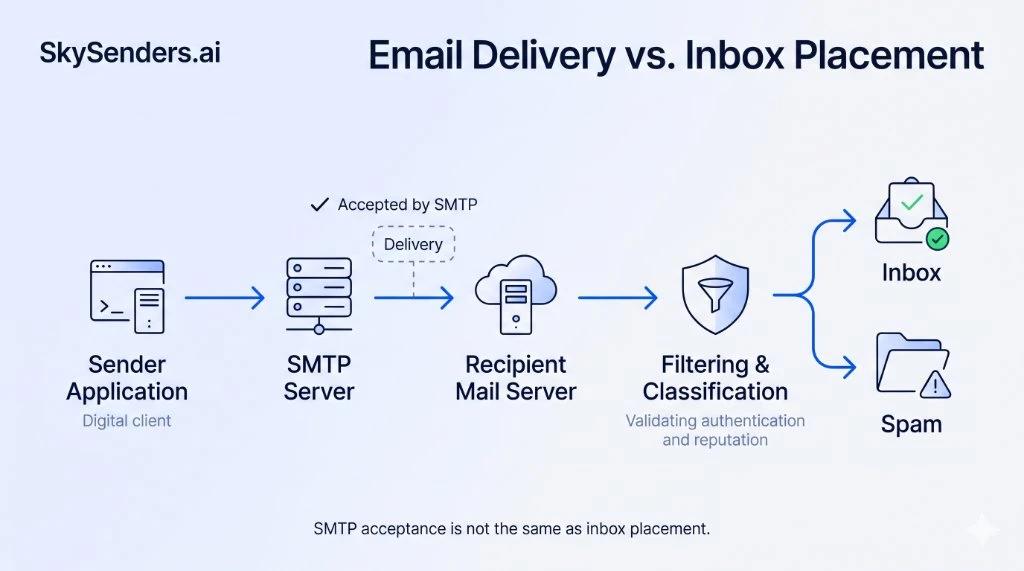
Figure 1: SMTP transport acceptance versus final inbox placement filtering pipeline.
2. Authentication Failures: SPF, DKIM, and DMARC Alignment
Email authentication helps receiving providers verify whether an email was authorized by the sending domain and whether its contents were altered in transit. While valid authentication records will not guarantee inbox placement on their own, invalid or misaligned authentication records can increase the risk of rejection or spam placement, depending on the receiving provider's policies.
SPF (RFC 7208): Envelope Sender Authorization
Sender Policy Framework (SPF) allows a domain owner to publish a list of authorized IP addresses or subnets permitted to send email on behalf of their domain via a DNS TXT record:
v=spf1 ip4:198.51.100.25 include:_spf.google.com -all
The Technical Nuance: SPF does not validate the visible From: address displayed in the recipient's mail client. Instead, it validates the envelope sender (the RFC 5321.MailFrom or Return-Path address). In addition, SPF evaluation is subject to a limit of 10 DNS-query-causing terms, including mechanisms such as include, a, mx and exists. Exceeding this limit results in a permerror. Nested includes can also contribute to the limit.
DKIM (RFC 6376): Cryptographic Body and Header Signing
DomainKeys Identified Mail (DKIM) attaches an asymmetric cryptographic signature to outgoing messages. The sending MTA signs specified headers and a body hash using a private key, while the receiving MTA retrieves the public key via DNS under a selector subdomain.
Key Strength and Body Integrity: Use a strong DKIM key, preferably 2048-bit RSA where supported. Check the current requirements of your mailbox provider and sending infrastructure. Additionally, if an intermediary mail gateway or tracking proxy modifies whitespace, alters encoding, or injects a footer after the message is signed, the body hash verification (bh=) fails, rendering the signature invalid (dkim=fail).
DMARC (RFC 7489 / RFC 9989): Identifier Alignment
Domain-based Message Authentication, Reporting, and Conformance (DMARC) acts as the governance layer over SPF and DKIM. DMARC verifies Identifier Alignment: the domain in the visible From: header (RFC 5322.From) must match the domain authenticated by SPF, DKIM, or both.
- Relaxed Alignment (Default): The organizational root domain must match (e.g., mail.domain.com aligns with domain.com).
- Strict Alignment (aspf=s, adkim=s): The exact Fully Qualified Domain Name (FQDN) must match.
If you send through a shared relay where SPF passes for the relay provider's domain, but you do not sign with a custom DKIM key for your visible domain, DMARC alignment fails. Without alignment, mailbox providers treat the message as an unverified identity.
3. IP Reputation and Domain Reputation
Receiving mail systems evaluate senders across multiple reputation layers simultaneously, with IP reputation and domain reputation carrying significant weight.
Sending IP Reputation
Your sending IP address reflects the network-level trustworthiness of the host transmitting the packets:
- Shared IP Pools: Many entry-level outreach tools route multiple customers through shared IP clusters. If a sender on your assigned IP sends unwanted email and triggers spam traps, the entire IP's reputation can suffer, affecting delivery for other users sharing that IP.
- Dedicated IP Infrastructure: Dedicated IPs isolate your deliverability from other senders. However, a dedicated IP has no baseline reputation out of the box. Sending high volume from a cold, un-warmed dedicated IP will trigger automated defensive throttling.
Domain Reputation
Your domain reputation is tied directly to your brand identity, specifically the root domain, subdomains, and the visible From: address. Unlike IP reputation, domain reputation persists across infrastructure changes. If your domain develops a negative reputation in Google Postmaster Tools, migrating to a new IP address or changing SMTP providers will not immediately resolve the issue. Receiving filters continue recognizing the domain identity and adjusting inbox placement accordingly.
4. Sending Velocity, Volume Spikes, and Behavioral Patterns
Spam filters evaluate patterns over time. Normal business correspondence typically exhibits steady, predictable growth, whereas sudden volume surges can trigger defensive filtering.
Volume Spikes on Newer Domains
As an illustrative example, consider a new sending domain that sends 20 emails on Monday and suddenly increases to 800 emails on Thursday. That sharp shift in volume can trigger defensive responses from receiving mail servers, such as temporary SMTP deferrals (451 4.7.1 Try again later) or routing excess volume to the spam folder while evaluating recipient reactions.
Mailbox-Level Sending Limits
Sending volume should be increased gradually and adjusted according to mailbox-provider limits, domain history, recipient responses and observed delivery behavior. There is no universal daily volume that guarantees inbox placement. Distributing outreach across multiple secondary domains and mailboxes helps manage volume and reduce reliance on any single sending account.
5. Recipient List Hygiene and Spam Complaint Thresholds
Even well-configured infrastructure on a dedicated IP can encounter delivery issues if recipient data quality is neglected.
Spam Traps and Inactive Addresses
- Pristine Spam Traps: Addresses created solely to identify unauthorized list acquisition. They have never opted into any mailing list, and hitting them can prompt immediate blocklist listings.
- Recycled Spam Traps: Abandoned mailboxes reactivated by providers after prolonged inactivity. Hitting them signals poor list hygiene and lack of routine verification.
Hard Bounces and Spam Complaint Rates
A consistently high hard-bounce rate can indicate poor list quality and increase deliverability risk. Monitor bounce rates over time and investigate sudden increases rather than relying on a universal threshold. Furthermore, Google recommends keeping reported spam rates below 0.10% and avoiding rates of 0.30% or higher. High complaint rates can negatively affect message classification and delivery. These figures should be treated as warning thresholds, not acceptable operating targets. In cold outreach, recipient disinterest quickly translates into spam complaints if targeting is irrelevant or subject lines misrepresent the offer.
6. Tracking Links and Redirects
The payload inside your email is evaluated alongside network headers. Most sales engagement platforms track opens and clicks by rewriting URLs through a tracking domain. Where link tracking is necessary, consider using a dedicated custom tracking domain with properly configured DNS. Monitor its reputation and avoid unnecessary redirects. In addition, ensure that anchor text matches the destination domain, as mismatched hyperlinks can trigger anti-phishing safeguards.
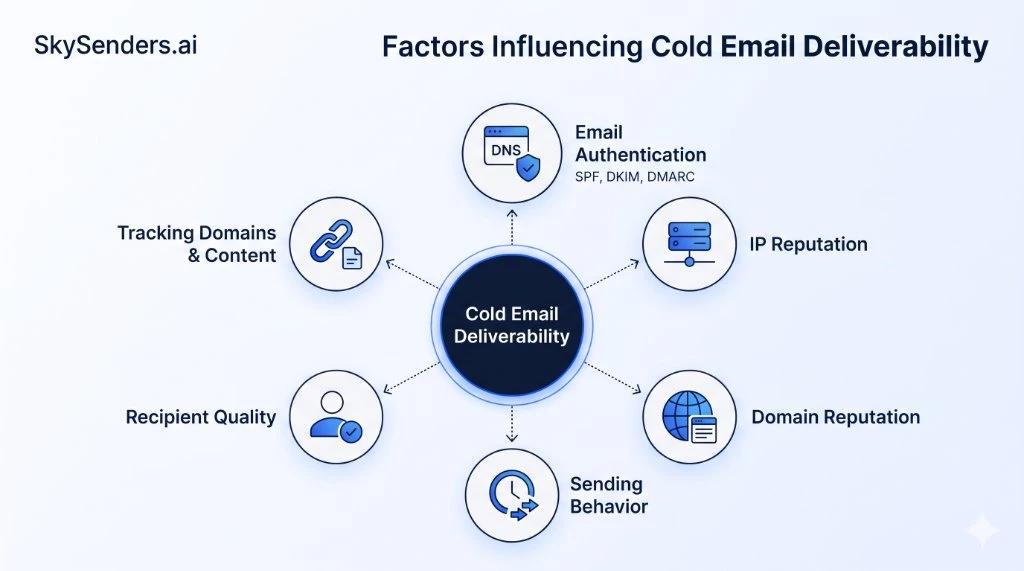
Figure 2: The six core pillars dictating cold email inbox placement.
7. Deliverability Breakdown Matrix
To isolate potential deliverability issues, review your sending setup against these primary infrastructure areas:
| Category | Primary Technical Factor | Observable Indicator | Recommended Action |
|---|---|---|---|
| Authentication | SPF, DKIM or DMARC alignment issue | Headers indicate `dmarc=fail` or `spf=softfail` | Check DKIM signature validity and align Return-Path with visible From domain |
| IP Reputation | Shared IP pool affected by neighboring senders | SMTP deferrals (`421`) or increased spam placement | Consider dedicated sending infrastructure with a gradual ramp-up plan |
| Domain Reputation | Negative sending history or high complaint volume | Provider postmaster tools indicate degraded domain reputation | Pause active campaigns, re-verify recipient lists, and review engagement signals |
| Sending Patterns | Unusually abrupt volume increases | Temporary `451 4.7.1` rate-limiting responses | Pace sending volume gradually based on observed delivery feedback |
| List Quality | High bounce frequency or hitting spam traps | Elevated bounce rates or blocklist listings | Validate recipient addresses before sending and remove unengaged contacts |
| Tracking & Links | Tracking domain or redirects flagged by security filters | Messages filtered to spam or promotional tabs | Use a dedicated custom tracking domain and minimize redirect hops |
Building Resilient Outbound Email Infrastructure
Cold email deliverability is governed by network trust, cryptographic standards, and provider filtering algorithms. For teams building sustainable outbound operations, separating corporate mailboxes from cold outreach is a foundational step.
This is why dedicated email infrastructure is increasingly evaluated by outbound teams. Platforms like SkySenders Private SMTP, provide dedicated sending infrastructure, automated DNS configuration and greater control over the sending environment, though long-term inbox placement still depends on healthy sending practices and recipient engagement.
What to Measure Next
Understanding why cold emails land in spam is the first step toward diagnosing delivery issues. In our companion guide, How to Diagnose and Fix Cold Email Deliverability Problems, we examine practical diagnostic workflows: inspecting raw RFC 5322 email headers, interpreting DMARC aggregate XML reports, and reviewing postmaster telemetry.
Technical References & RFC Standards
- RFC 5321: Simple Mail Transfer Protocol (SMTP)
- RFC 7208: Sender Policy Framework (SPF)
- RFC 6376: DomainKeys Identified Mail (DKIM) Signatures
- RFC 7489 / RFC 9989: Domain-based Message Authentication, Reporting, and Conformance (DMARC)
- Google Workspace: Email Sender Guidelines and Spam Thresholds
- Yahoo Senders: Sender Best Practices and Requirements
Ready to Scale Your Cold Email Outreach?
Get dedicated email infrastructure per domain, automated DNS configuration and greater control over your outbound email environment with SkySenders.
Get Started with SkySenders

