
IP Reputation vs Domain Reputation: How Email Providers Evaluate Senders
Ramesh Kumar
Founder & Email Deliverability Expert

Table of Contents
- 1. What Is IP Reputation?
- 2. What Is Domain Reputation?
- 3. IP Reputation vs Domain Reputation: What's the Difference?
- 4. How Do Email Providers Evaluate Sender Reputation?
- 5. Shared IP vs Dedicated IP: What Actually Changes?
- 6. How to Monitor IP and Domain Reputation
- 7. Four Practical Deliverability Scenarios
- 8. Engineering Checklist: Protect Both IP and Domain Reputation
- Conclusion: IP Reputation and Domain Reputation Work Together
- Technical References
A dedicated IP address does not automatically mean better email deliverability. You can have a clean sending IP and still land in spam. You can also have a trusted sending domain whose emails are affected by a poor shared IP.
The reason is simple: email providers evaluate more than just the server that connects to them.
IP reputation and domain reputation are two important parts of sender reputation. They are related, but they measure different aspects of your email infrastructure and sending behavior. IP reputation measures network-level transmission behavior, while domain reputation reflects the history, authentication, and recipient engagement associated with your domain identity.
In our earlier guides on Why Cold Emails Go to Spam, How to Fix Cold Email Deliverability, and SPF, DKIM and DMARC Explained, we analyzed delivery failure modes and authentication protocols. In this guide, we examine how IP and domain reputation work, how mailbox providers evaluate senders, and what you should monitor when managing email infrastructure.
1. What Is IP Reputation?
IP reputation is the trust associated with the IP address used to deliver an email.
When your mail server connects to Gmail, Outlook, Yahoo, or another receiving server, the recipient's infrastructure evaluates the connecting IP address and its sending history. An IP address with a consistent history of legitimate email traffic is generally more trustworthy than one associated with spam, abuse, or erratic traffic patterns.
Several factors influence IP reputation:
• Sending history: How the IP has been used over time and its consistency across recent weeks.
• Spam complaints: How frequently recipients report messages as spam. Google recommends keeping the reported spam rate below 0.10% and avoiding rates of 0.30% or higher. These are different thresholds: 0.10% is the recommended target, while 0.30% or higher can have a particularly serious impact on delivery and mitigation eligibility.
• Sending patterns: Sudden volume spikes, unusual traffic bursts, or irregular sending behavior.
• Bounce behavior: Repeated delivery attempts to invalid or non-existent recipients.
• IP neighborhood: Other senders and infrastructure hosted within the same network subnet or Autonomous System Number (ASN).
• Infrastructure signals: Valid reverse DNS (PTR) matching forward DNS (FCrDNS), consistent HELO/EHLO identity, and blocklist status.
A dedicated IP gives you control over traffic originating from that address, but it does not establish a positive reputation automatically. A new IP has no established history and must build trust gradually through disciplined sending.
2. What Is Domain Reputation?
Domain reputation is the trust associated with a domain used in email communication and authentication.
Unlike IP reputation, which is tied to a network host address, domain reputation can be associated with several domain identities used during email transmission and authentication. These include the visible From domain, the SPF-authenticated MAIL FROM domain, the DKIM signing domain (d=), and domains used in message URLs. Providers may evaluate these identities differently. Consider a typical message transaction:
Visible From: hello@example.com (RFC 5322 header From domain displayed to recipients)
Envelope Sender / Return-Path: bounce@outbound.example.com (RFC 5321 MAIL FROM envelope domain evaluated by SPF)
DKIM signing domain: example.com (the d= domain claiming cryptographic responsibility)
Sending IP: 203.0.113.10 (connecting network host)
The receiving provider evaluates multiple identities across the message transaction simultaneously, distinguishing between the visible From domain, the envelope MAIL FROM identity, and the cryptographic signing domain.
Domain reputation is shaped by key signals:
• Sending history: Volume stability and engagement trends associated with the domain.
• Recipient feedback: Spam complaints and negative recipient actions, as well as sending relevance to intended recipients.
• Authentication consistency: Proper configuration and alignment of SPF, DKIM, and DMARC records.
• Link and tracking domains: The reputation of URLs and click-tracking hosts in the message body.
• Domain history and associations: New domains may have limited sending history, making it harder for receiving providers to establish a reputation. The impact depends on the provider, sending behavior, recipient feedback, and other signals. Using subdomains does not guarantee complete reputation isolation from the organizational domain.
Domain reputation is portable across infrastructure. When you move to a new SMTP provider, your sending IP changes, but historical domain reputation signals persist. Changing IP addresses alone will not resolve deliverability issues caused by poor domain reputation.
3. IP Reputation vs Domain Reputation: What's the Difference?
Both signals contribute to how mailbox providers evaluate incoming email, but they represent distinct parts of your sending environment.
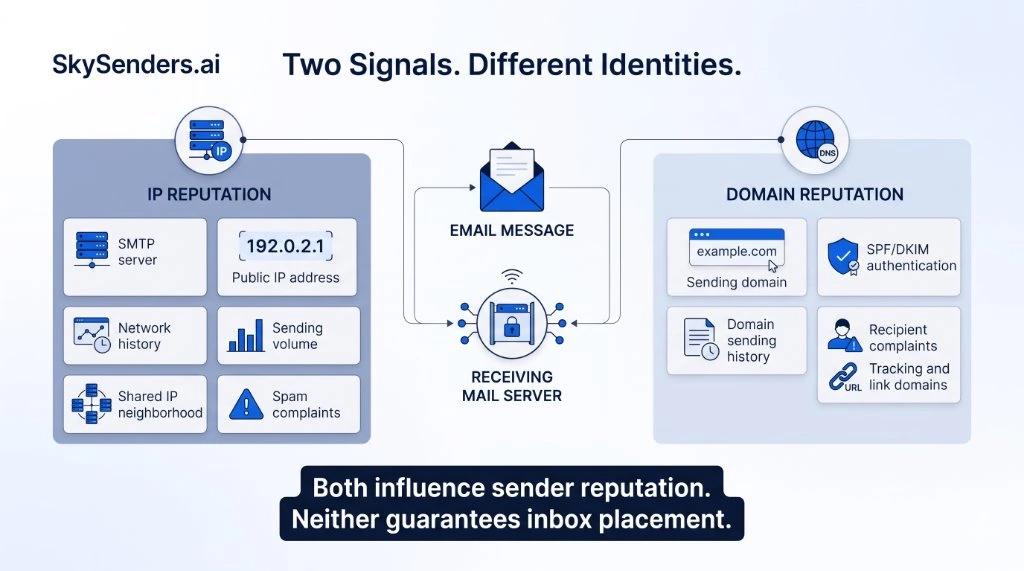
Figure 1: IP reputation evaluates network-level sending behavior, while domain reputation tracks authenticated domain identities.
The technical differences are summarized below:
| Factor | IP Reputation | Domain Reputation |
|---|---|---|
| Associated With | Sending IP address | Domain identity |
| Main Focus | Network-level sending behavior | Domain-level history and authentication |
| Shared Infrastructure Exposure | Can be influenced by other senders sharing the same IP | Primarily associated with domain identities, but related infrastructure and domain associations may also matter |
| Portability | Changes when sending IP changes | Domain-associated history may remain relevant after IP or ESP changes, depending on the receiving provider |
| Important Signals | Volume consistency, IP blocklists, FCrDNS, complaints | DMARC alignment, user engagement, spam rate, link URLs |
| Monitoring Tools | Microsoft SNDS, Spamhaus, Google Postmaster Tools | Google Postmaster Tools, DMARC reports |
| Control | More control via dedicated IP infrastructure | More control through list quality and sending practices |
Neither signal functions in isolation. Receiving algorithms analyze the connecting IP, authenticated domains, message content, recipient feedback, and URL reputation together. There is no universal formula like 70% domain and 30% IP; providers adjust their evaluations dynamically.
4. How Do Email Providers Evaluate Sender Reputation?
Mailbox providers do not publish complete spam-filtering algorithms, but their official sender documentation clarifies that reputation relies on a multifaceted evaluation pipeline.
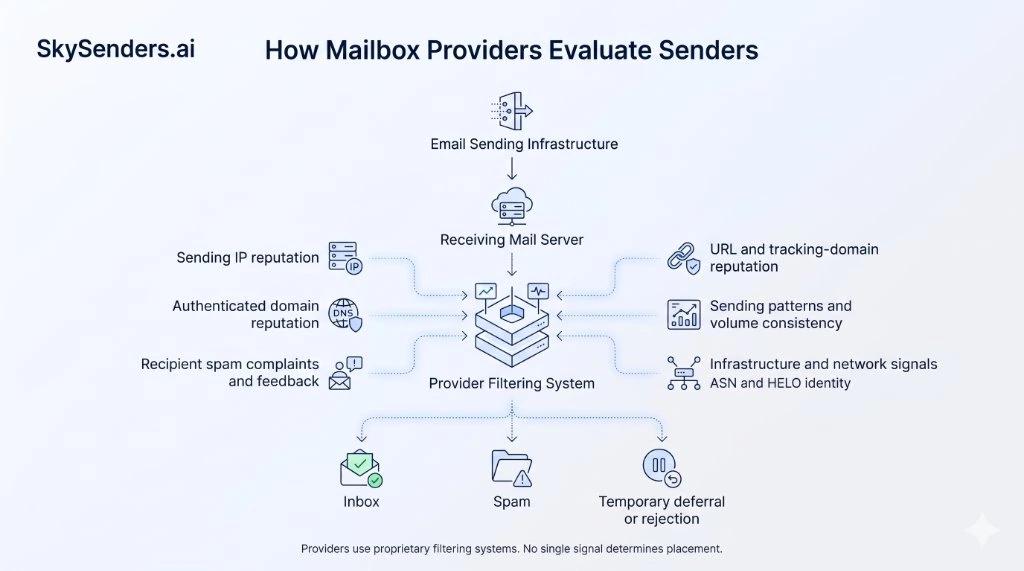
Figure 2: The multifaceted signal pipeline mailbox providers use to evaluate incoming message streams.
Major providers evaluate several distinct layers:
• IP address reputation: Receiving servers evaluate the IP initiating the SMTP connection, including traffic volume, complaints, reverse DNS, and blocklists. Microsoft SNDS provides IP-level data for Outlook.com, while Google Postmaster Tools offers an IP Reputation dashboard for high-volume senders.
• Domain reputation: Providers inspect the domains used for sending and authentication. Google Postmaster Tools provides a dedicated Domain Reputation dashboard, tracking the exact domain used for SPF and DKIM authentication. This is critical when managing multiple sending subdomains.
• Recipient feedback: Recipient feedback is important. Spam complaints can negatively affect reputation, while sending relevant messages to recipients who want them helps reduce unwanted-mail signals.
• URL, ASN, and infrastructure reputation: Yahoo explicitly documents that its algorithms evaluate IP reputation, URL reputation, domain reputation, ASN signals, and DKIM/DMARC authentication collectively. Including blacklisted domains or compromised redirect links can degrade delivery even on clean IPs.
5. Shared IP vs Dedicated IP: What Actually Changes?
Choosing between shared and dedicated sending infrastructure is a core architectural decision for any outbound sender.
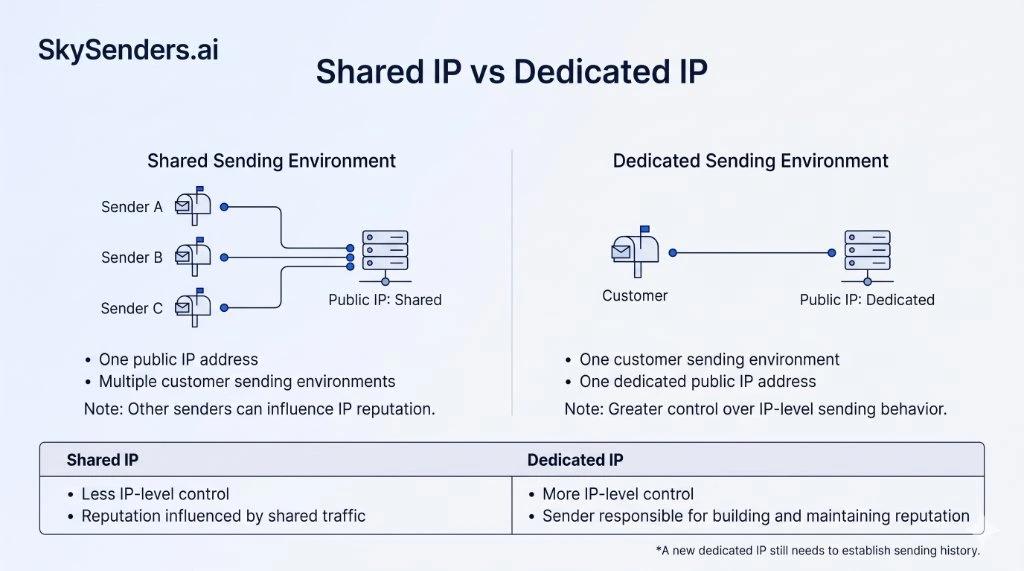
Figure 3: Shared sending pools aggregate multi-tenant traffic, while dedicated infrastructure provides IP-level isolation from unrelated senders.
Shared IP Infrastructure
In a shared environment, multiple customer accounts transmit email through the same public IP address.
• Advantages: The provider manages IP reputation and PTR records. An established, well-managed shared pool can provide a consistent sending history without requiring each customer to generate enough volume to maintain an individual IP reputation.
• Risks: Other senders sharing the IP address can harm its reputation. If another tenant sends abusive traffic, the IP may be blocked or throttled, impacting your delivery.
Dedicated IP Infrastructure
With a dedicated IP, your sending traffic originates exclusively from an IP assigned to your organization.
• Advantages: IP-level isolation from unrelated tenants. Greater control over traffic originating from your IP, reduced exposure to unrelated senders sharing that same IP, and better visibility into IP-level behavior. You may also have more control over reverse DNS and sending throughput, depending on your infrastructure provider.
• Responsibilities: You are solely responsible for building and maintaining reputation. A new IP has no established sending history and must be warmed up gradually. Furthermore, dedicated IPs require consistent, predictable sending patterns.
A dedicated IP should not be purchased with the assumption that it automatically fixes deliverability. Dedicated infrastructure provides isolation and control; it cannot compensate for poor recipient targeting or high complaint rates.
6. How to Monitor IP and Domain Reputation
Because mailbox providers operate independent filtering systems, no single dashboard displays your complete global reputation. Senders should consult multiple authoritative sources.
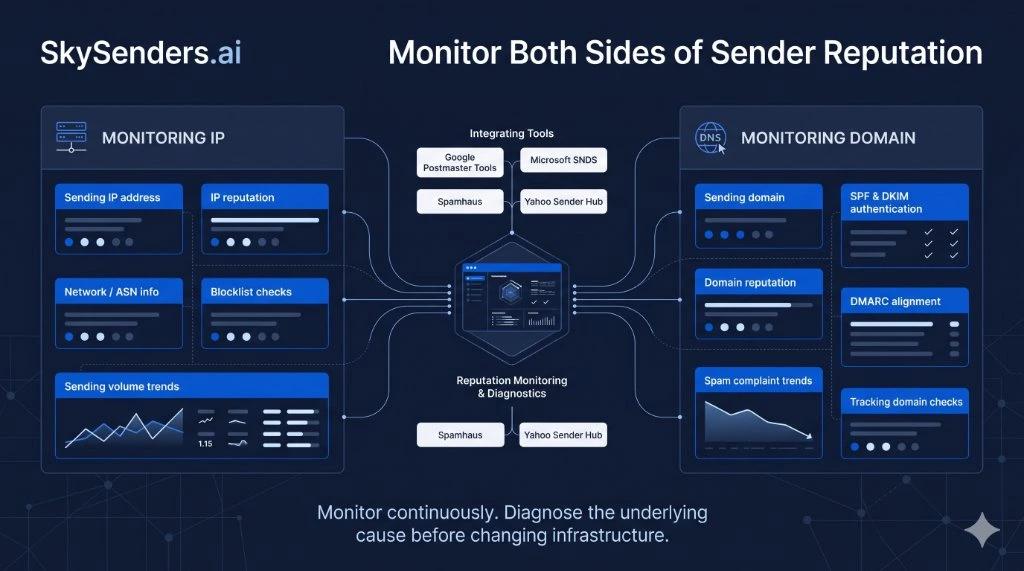
Figure 4: Monitoring sender health across network IP metrics and domain authentication telemetry.
Primary monitoring platforms include:
• Google Postmaster Tools: Provides visibility into eligible Gmail traffic. Key dashboards include IP Reputation (graded Bad, Low, Medium, or High), Domain Reputation (tracking the exact authenticated domain), Spam Rate, Authentication compliance, and Delivery Errors. Low sending volume may mean that some reputation dashboards do not display data for a particular day. Do not interpret missing data as proof of good or bad reputation.
• Microsoft Smart Network Data Services (SNDS): Microsoft SNDS provides IP-level visibility into Outlook.com traffic, including message volume, complaint reports, aggregate filter results, and certain security-related indicators. Access generally requires authorization for the relevant IP range. SNDS data does not directly represent inbox placement.
• Spamhaus Reputation Checker: Checks whether sending IPs or domains are listed on major blocklists like the SBL or DBL.
• Yahoo Sender Hub: Offers technical requirements, feedback-loop resources, and best practices for delivering to Yahoo and AOL recipients.
7. Four Practical Deliverability Scenarios
Understanding the interaction between IP and domain reputation becomes clearest when examining real production scenarios:
Scenario A: Clean IP, Poor Domain Reputation
A sender migrates to a pristine dedicated IP address. However, they continue sending from a domain that has accumulated high complaint rates and poor engagement.
• Outcome: Deliverability remains poor. Changing the IP address does not remove historical domain signals. Receiving providers may continue to classify or restrict messages based on combined domain, IP, and other reputation signals.
• Action: Audit list quality, verify authentication alignment, remove unengaged recipients, and rebuild domain trust before changing infrastructure.
Scenario B: Good Domain, Poor Shared IP
A company maintains a reputable domain with high engagement, but routes email through an unvetted shared IP pool. An unrelated tenant on the pool sends abusive spam, triggering provider throttles.
• Outcome: Messages may encounter filtering, temporary deferrals (SMTP 4xx), or rejection depending on the provider's evaluation of the shared IP and other signals, despite the domain's positive history.
• Action: Investigate the shared pool with your provider, or migrate to isolated dedicated infrastructure.
Scenario C: Moving to a New Dedicated IP
A sender switches from shared hosting to a dedicated IP and immediately dispatches full campaign volume.
• Outcome: Sudden high-volume sending from a new IP may trigger temporary deferrals or additional scrutiny. While the absence of sending history does not automatically guarantee throttling, providers treat unestablished IP traffic cautiously.
• Action: Increase sending volume gradually. Start with your most engaged recipients and scale over time. Pacing must adjust dynamically based on provider response codes.
Scenario D: Both IP and Domain Have Poor Reputation
A sender facing deliverability issues changes both their domain and IP, but continues sending unverified, scraped contact lists.
• Outcome: The new infrastructure is quickly degraded by fresh complaints and bounces, landing back in spam.
• Action: Fix underlying sending practices. Infrastructure changes cannot substitute for audience relevance and list hygiene.
8. Engineering Checklist: Protect Both IP and Domain Reputation
Audit this technical checklist when operating your outbound sending environment:
• Verify that sending IPs have correctly configured PTR records and that forward DNS is consistent with the reverse lookup, in line with the requirements of your target mailbox providers.
• Ensure the SMTP HELO/EHLO hostname is valid and correctly configured for your sending infrastructure.
• Maintain valid SPF, DKIM, and DMARC records with aligned identifiers.
• Monitor the exact domain used for authentication in Google Postmaster Tools.
• Audit embedded links, tracking domains, and image assets for blocklist status.
• Maintain consistent daily sending volumes and avoid erratic spikes.
• Validate recipient addresses before sending. Monitor hard-bounce rates by provider and investigate sudden increases rather than relying on a universal threshold.
• Honor unsubscribe requests and remove inactive contacts promptly.
• Review delivery metrics across Gmail, Outlook, and Yahoo independently.
Conclusion: IP Reputation and Domain Reputation Work Together
IP reputation tells mailbox providers about the network address delivering your mail. Domain reputation provides an ongoing view of your brand identity and recipient engagement. Neither signal alone determines inbox placement, and neither offers an automatic guarantee.
A dedicated IP gives you control and IP-level isolation from unrelated senders, while responsible domain management maintains sender trust. Both must be supported by sound sending practices and ongoing monitoring.
At SkySenders, we engineer dedicated outbound infrastructure with dedicated IPs and controlled sending environments. Explore SkySenders Private SMTP to learn more about dedicated email infrastructure.
Technical References
• Google Workspace: Google Email Sender Guidelines
• Google Support: Postmaster Tools Metrics and Reputation Dashboards
• Microsoft Substrate: Smart Network Data Services (SNDS)
• Yahoo Sender Hub: Yahoo Email Sender Best Practices
• Yahoo Postmaster: Yahoo Sender FAQs and Technical Requirements
• Spamhaus Technology: Spamhaus Sender Best Practice Guidelines
• Spamhaus Research: How Email Reputation Works
Ready to Scale Your Cold Email Outreach?
Get dedicated email infrastructure per domain, automated DNS configuration and greater control over your outbound email environment with SkySenders.
Get Started with SkySenders

