
SPF, DKIM and DMARC Explained: A Complete Engineering Guide
Ramesh Kumar
Founder & Email Deliverability Expert

Table of Contents
- 1. How SPF, DKIM and DMARC Work Together
- 2. SPF: Authorizing Sending Servers (RFC 7208)
- What SPF Actually Evaluates
- SPF Record Syntax and Structure
- The 10 DNS Lookup Limit
- 3. DKIM: Cryptographically Signing Email (RFC 6376)
- How the Cryptographic Flow Operates
- Anatomy of a DKIM-Signature Header
- 4. DMARC: Connecting Authentication to the Visible From Domain (RFC 9989)
- Relaxed vs Strict Domain Alignment
- DMARC Policy Progression
- 5. Complete Worked Authentication Example
- 6. How to Verify DNS Records Using dig
- 7. Common SPF, DKIM and DMARC Configuration Mistakes
- 8. An Engineering Implementation Checklist
- Final Thoughts
- Technical References
When an email arrives at a receiving mail exchange, how does the destination provider verify whether the transmitting server is authorized to send on behalf of the domain displayed in the header?
The Simple Mail Transfer Protocol (SMTP), originally designed under RFC 821 and RFC 5321, contains no native mechanism for sender identity verification. By default, any connecting client can transmit messages claiming any arbitrary sender address in the visible From: header.
To resolve this architectural vulnerability, the internet engineering community developed three complementary standards: Sender Policy Framework (SPF), DomainKeys Identified Mail (DKIM), and Domain-based Message Authentication, Reporting, and Conformance (DMARC).
These protocols address distinct parts of the verification chain: SPF validates the transmitting server network address; DKIM validates cryptographic body and header signatures; and DMARC enforces domain identifier alignment between technical authentication identities and the visible From: address.
In our earlier guides on Why Cold Emails Go to Spam and How to Fix Cold Email Deliverability, we examined how authentication failures trigger inbox placement drops and how to diagnose delivery errors. This engineering guide examines the exact mechanics, record syntax, cryptographic validation flows, and domain alignment rules governing SPF, DKIM, and DMARC.
A foundational principle: Passing SPF, DKIM, and DMARC does not guarantee inbox placement. Authentication establishes verified sender identity; mailbox providers still evaluate IP reputation, domain history, recipient engagement signals, spam complaints, and content filters to decide whether a message reaches the inbox or the spam folder.
1. How SPF, DKIM and DMARC Work Together
Consider an outgoing email dispatched from hello@example.com. When this message reaches the recipient mail exchange, the receiving MTA must determine whether the sending infrastructure was genuinely authorized by example.com.
Each protocol contributes a distinct verification layer to the authentication pipeline:
- SPF (Server Authorization): Validates that the transmitting server IP address is listed in the published DNS policy for the envelope sender domain (the RFC 5321.MailFrom identity, commonly matching the Return-Path).
- DKIM (Cryptographic Integrity): Validates an asymmetric digital signature attached to the message headers and body hash, retrieving the corresponding public key from DNS to prove that the email originated from the signing domain (d=) and was not modified in transit.
- DMARC (Identifier Alignment and Policy): Validates that the domain authenticated by SPF or DKIM aligns with the visible From: domain (RFC 5322.From) presented to the human recipient, instructing receiving servers how to handle unaligned or failing messages.
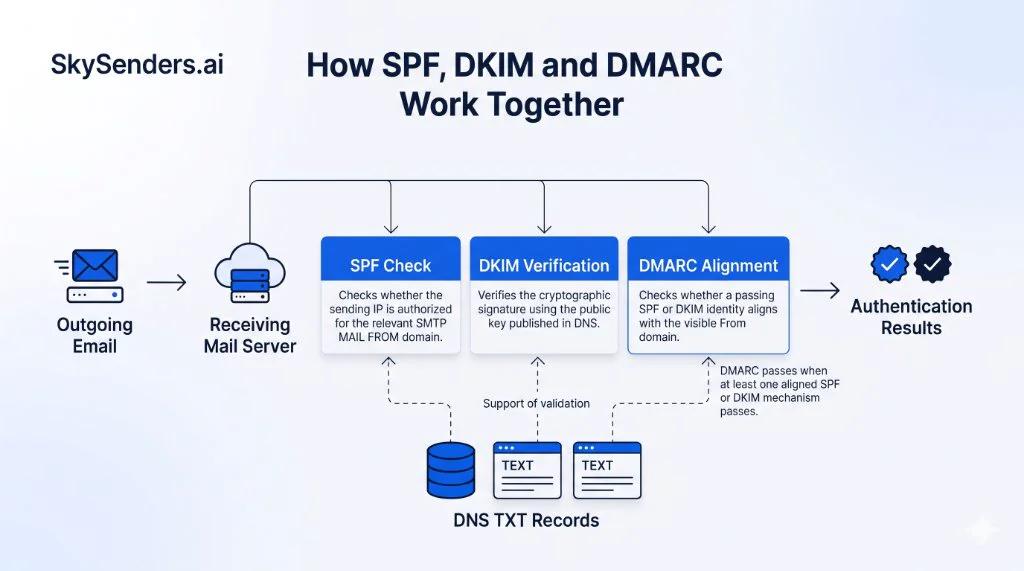
Figure 1: The layered email authentication pipeline from SMTP transmission to final authentication results.
The core DMARC evaluation rule: A message passes DMARC if at least one of SPF or DKIM both passes and aligns with the visible From: domain. Both mechanisms do not need to pass simultaneously; one passing, aligned protocol is sufficient for DMARC validation.
2. SPF: Authorizing Sending Servers (RFC 7208)
Sender Policy Framework (RFC 7208) allows domain owners to publish a list of IP addresses and server hosts authorized to send email on behalf of their domain.
What SPF Actually Evaluates
A frequent misconception in email outreach is that SPF checks the visible From: address. It does not. In standard SMTP transactions, SPF evaluates the domain supplied in the SMTP MAIL FROM command (the envelope sender, which commonly populates the Return-Path header). For non-delivery reports (bounces) where the MAIL FROM envelope sender is empty (<>), SPF evaluates the domain transmitted in the SMTP HELO or EHLO greeting.
DMARC uses this SPF-authenticated MAIL FROM domain during its alignment check; it does not evaluate the connecting IP or HELO identity against the visible From: domain directly.
SPF Record Syntax and Structure
An SPF policy is published as a standard DNS TXT record on the sending domain. Consider this example using the RFC 5737 documentation IP 203.0.113.10:
example.com. IN TXT "v=spf1 ip4:203.0.113.10 include:_spf.google.com ~all"
Parsing this policy term by term:
- v=spf1: Identifies the TXT record as an SPF version 1 specification. This tag must appear at the beginning of the record.
- ip4:203.0.113.10: Authorizes the specific IPv4 address (or CIDR subnet) to send mail on behalf of the domain.
- include:_spf.google.com: Recursively evaluates the SPF record published by _spf.google.com. If the connecting IP is authorized by Google policy, the mechanism matches.
- all Qualifiers: Defines the evaluation result when an IP is not matched by earlier mechanisms. The ~all qualifier returns an SPF Softfail result; it indicates that the domain believes the host is not authorized, but leaves the disposition to receiver policy rather than mandating acceptance or tagging. The -all qualifier returns an SPF Fail result; while it expresses an explicit authorization failure, SPF Fail does not itself mandate rejection by every receiving server, as final disposition depends on receiving provider policy and DMARC evaluation. The + qualifier indicates Pass (the default prefix if omitted), and ? indicates Neutral.
The 10 DNS Lookup Limit
To protect receiving MTAs from denial-of-service loops, RFC 7208 section 4.6.4 limits SPF evaluation to a maximum of 10 DNS-query-causing terms.
Terms that consume this lookup limit include: include, a, mx, ptr, exists, and redirect. Nested lookups inside third-party includes also count toward the single 10-query budget. Furthermore, RFC 7208 section 5.5 explicitly recommends against publishing the ptr mechanism due to slow lookups, reliability risks, and unnecessary operational burden on nameservers.
By contrast, mechanisms that do not perform host name lookups (such as ip4, ip6, and all) do not consume the 10-query limit. Exceeding 10 query terms causes receiving providers to terminate evaluation with an immediate PermError.
Critical SPF rule: Publish exactly one SPF TXT record per domain. Publishing multiple TXT records starting with v=spf1 violates RFC 7208 section 3.2 and triggers an immediate PermError, rendering SPF authentication completely invalid.
3. DKIM: Cryptographically Signing Email (RFC 6376)
DomainKeys Identified Mail (RFC 6376) uses public-key cryptography to provide verifiable domain-level attribution and tamper detection. DKIM establishes that a specific signing domain (the identity published in the d= tag) claims responsibility for the message. It does not necessarily attest to the identity of the original author or prove that the sender address in the header is trustworthy on its own, which is why DMARC domain alignment is essential. Furthermore, DKIM validates the specifically signed headers and the canonicalized body hash, rather than every possible header or optional component that downstream mail agents might append.
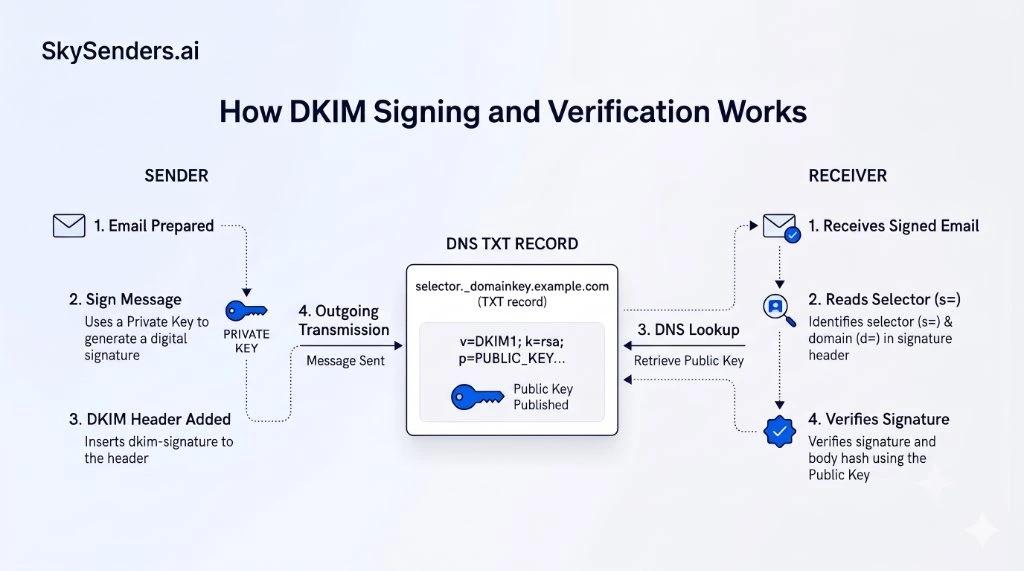
Figure 2: The asymmetric cryptographic flow between sender signing, DNS public key retrieval, and recipient verification.
How the Cryptographic Flow Operates
The cryptographic signing and verification process functions in four distinct stages:
- Body Canonicalization and Hash Calculation: The sending MTA normalizes the message body according to the chosen canonicalization algorithm, such as relaxed. If the c= tag is omitted, RFC 6376 defines the default as simple/simple, which requires strict character-for-character matching. The MTA then computes a SHA-256 cryptographic hash across the canonicalized body, stored in the bh= tag.
- Header Signing: The sending server selects critical message headers (such as From, To, Subject, and Date) along with the body hash, and generates a digital signature across this data block using its private key (stored securely on the sending MTA). This produces the digital signature value (b=).
- Signature Attachment: The sending server prepends the DKIM-Signature header to the outgoing email before transmitting it across SMTP.
- Public Key Verification: The receiving MTA extracts the selector tag (s=) and signing domain tag (d=). It queries DNS for selector._domainkey.signing-domain to fetch the published public key, verifies the digital signature using this public key, recomputes the body hash, and validates that the signed headers and canonicalized body remained unaltered in transit.
Anatomy of a DKIM-Signature Header
DKIM-Signature: v=1; a=rsa-sha256; d=example.com; s=mail2026; c=relaxed/relaxed; q=dns/txt; h=from:to:subject:date:message-id; bh=iH9hFzW5...=; b=k8Jd9xQ...==
Key hygiene note: Domain owners should use strong cryptographic keys, preferably 2048-bit RSA where supported by the DNS provider and sending infrastructure. Always verify your sending platform and mailbox provider guidelines for supported key types and minimum key length requirements. Furthermore, if an intermediary mail gateway or outbound tracking proxy alters message whitespace under simple canonicalization, injects a tracking script, or modifies footers after signing, the receiving server body hash comparison will fail, producing an immediate dkim=fail result.
4. DMARC: Connecting Authentication to the Visible From Domain (RFC 9989)
SPF and DKIM operate independently and validate technical identities that recipients rarely see. A spammer could send an email with an authorized SPF record for spammer-domain.com and a valid DKIM signature for spammer-domain.com, while displaying paypal.com in the visible From: header.
Domain-based Message Authentication, Reporting, and Conformance under RFC 9989 (the current standard updating earlier RFC 7489) resolves this gap by requiring identifier alignment.
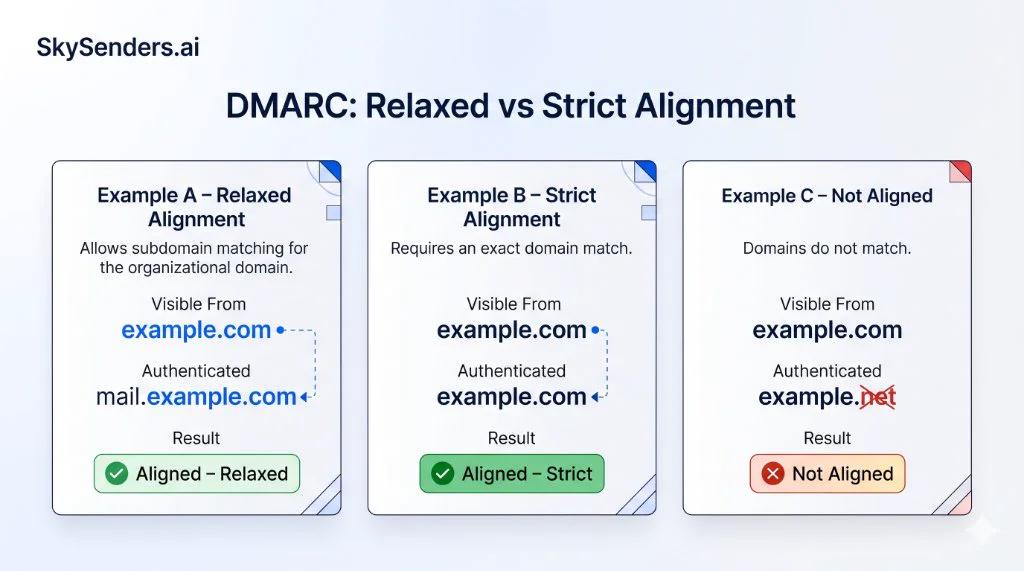
Figure 3: Evaluating organizational domain matching in relaxed mode versus exact FQDN matching in strict mode.
Relaxed vs Strict Domain Alignment
DMARC verifies that the domain in the visible From: header (RFC 5322.From) matches the domain authenticated by SPF, DKIM, or both. It supports two alignment modes:
- Relaxed Alignment (aspf=r, adkim=r): The authenticated domain and visible From: domain must share the same base Organizational Domain. For example, mail.example.com aligns with example.com under relaxed alignment. This is the default mode.
- Strict Alignment (aspf=s, adkim=s): The authenticated domain must match the visible From: domain exactly as a Fully Qualified Domain Name (FQDN). Under strict mode, mail.example.com does not align with example.com.
DMARC Policy Progression
A DMARC policy is published as a DNS TXT record under the _dmarc subdomain. Example:
_dmarc.example.com. IN TXT "v=DMARC1; p=none; rua=mailto:dmarc-rua@example.com; pct=100"
The p= tag instructs receiving systems how to handle unauthenticated mail:
- p=none (Monitoring): Instructs receivers to collect authentication telemetry and generate aggregate feedback reports (rua) without altering message delivery. This is a recommended initial monitoring stage that allows infrastructure teams to audit legitimate email streams before enforcing stricter policies. Aggregate reports are commonly sent periodically, often daily, depending on the reporting provider.
- p=quarantine (Quarantine Treatment): Requests that receivers treat failing messages with caution, such as routing them to a quarantine area or spam folder, depending on the receiver's local policy and filtering rules; it does not guarantee specific spam-folder placement.
- p=reject (Rejection Request): Requests that receivers reject unauthenticated or unaligned messages during delivery. While receivers often reject such messages during the SMTP transaction, specific SMTP error codes and rejection handling procedures vary across receiving mail systems.
Implementation caution: Never set a newly created domain directly to p=reject. If your organization relies on external billing tools, customer support software, or automated alerts that send mail using your domain, enforcing reject prematurely will cause legitimate messages to be blocked. Always monitor rua reports under p=none first.
5. Complete Worked Authentication Example
Let us examine how an email passes full authentication under inspection by a receiving mail provider.
Outgoing message parameters:
- Connecting IP: 203.0.113.10
- SMTP MAIL FROM (Return-Path): bounces@outbound.example.com
- Visible From: header: hello@example.com
- DKIM-Signature: d=example.com; s=s1;
The receiving provider executes these checks in order:
- SPF Evaluation: Queries outbound.example.com for TXT records. The published record authorizes 203.0.113.10. Result: spf=pass.
- SPF Alignment Check: Compares outbound.example.com against visible From: example.com. Both share the organizational root domain (example.com). Result: SPF Aligned (Relaxed).
- DKIM Verification: Queries s1._domainkey.example.com to retrieve the public key. Verifies the digital signature using the public key and confirms the body hash matches. Result: dkim=pass.
- DKIM Alignment Check: Compares signing domain d=example.com against From: example.com. Exact match. Result: DKIM Aligned (Strict and Relaxed).
- DMARC Policy Decision: Queries _dmarc.example.com. Because both SPF and DKIM passed with domain alignment, DMARC passes completely.
The receiving provider prepends the Authentication-Results header:
Authentication-Results: mx.google.com; dkim=pass header.i=@example.com header.s=s1; spf=pass (google.com: domain of bounces@outbound.example.com designates 203.0.113.10 as permitted sender) smtp.mailfrom=bounces@outbound.example.com; dmarc=pass (p=NONE sp=NONE dis=NONE) header.from=example.com
6. How to Verify DNS Records Using dig
Before launching outbound campaigns, verify your DNS records using command-line utilities such as dig. Ordinary dig commands query your local or configured recursive resolver by default. To bypass resolver caching or troubleshoot propagation latency, you can query your domain's authoritative nameservers directly using dig @ns1.example.com.
1. Verify SPF:
dig TXT outbound.example.com +short
Confirm that only one record starts with v=spf1 and that evaluation terms do not exceed the 10-lookup limit for the sending domain.
2. Verify DKIM:
dig TXT mail2026._domainkey.example.com +short
Confirm that the record exists and contains the valid public key string (p=). While the v=DKIM1 tag is optional in RFC 6376 DNS key records, if a version tag is present, it must be valid.
3. Verify DMARC:
dig TXT _dmarc.example.com +short
Confirm that the record begins with v=DMARC1; and specifies a designated reporting mailbox in rua.
7. Common SPF, DKIM and DMARC Configuration Mistakes
Avoid these frequent pitfalls encountered during outbound email setup:
- Multiple SPF Records: Adding a second SPF TXT record for a new sending tool instead of merging mechanisms into one record. Causes PermError.
- DNS Lookup Limit Exceeded: Stacking includes for marketing, CRM, and transaction relays until evaluation exceeds 10 query terms. Causes PermError.
- Shared Relay DKIM Misalignment: Signing emails with a shared service default key (d=sharedprovider.com) instead of configuring a custom domain key (d=example.com). DKIM passes, but DMARC alignment fails.
- Post-Signing Body Alteration: Tracking software, antivirus gateways, or footer injectors altering email contents after the MTA applied the DKIM signature. Invalidates the body hash (bh=).
- Premature p=reject Enforcement: Enforcing reject before discovering unauthenticated internal mail streams, causing critical transactional emails to be blocked.
8. An Engineering Implementation Checklist
Before scaling outbound email operations, verify this technical checklist:
- Exactly one SPF TXT record exists for the sending domain.
- SPF lookup-causing terms do not exceed 10 across all nested includes.
- Outgoing messages are cryptographically signed using strong DKIM keys, preferably 2048-bit RSA where supported.
- The DKIM signing domain (d=) aligns with the visible From: domain.
- A DMARC policy is published under _dmarc with active aggregate reporting (rua).
- Sending IPs possess valid reverse DNS (PTR) with corresponding forward DNS (FCrDNS), which is a key infrastructure requirement for providers such as Google.
- Real test email headers show spf=pass, dkim=pass, and dmarc=pass in Authentication-Results.
Final Thoughts
SPF, DKIM, and DMARC are not interchangeable records. They solve three distinct layers of identity verification: server authorization, message integrity, and visible domain alignment.
For outbound engineering teams, email authentication is foundational infrastructure that must be designed cleanly from day one, rather than scrambled together after deliverability drops.
At SkySenders, we believe outbound email operations require isolated, properly configured infrastructure. Dedicated email infrastructure platforms like SkySenders Private SMTP provide isolated email environments with automated SPF, 2048-bit DKIM, and DMARC configuration, giving outbound teams greater control and reliability over their sending pipeline.
Technical References
- SPF: RFC 7208 (Sender Policy Framework)
- DKIM: RFC 6376 (DomainKeys Identified Mail Signatures)
- DMARC: RFC 9989 (Domain-based Message Authentication, Reporting, and Conformance; RFC 7489 represents earlier standard)
- Google Workspace: Email Sender Guidelines and Requirements
- Yahoo Senders: Sender Best Practices and Requirements
Ready to Scale Your Cold Email Outreach?
Get dedicated email infrastructure per domain, automated DNS configuration and greater control over your outbound email environment with SkySenders.
Get Started with SkySenders

